On July 1, 2026, Microsoft raised the list price of most Microsoft 365 business plans. Business Standard went from $12.50 to $14.00 per user per month, Business Basic from $6.00 to $7.00, and some Frontline plans rose by a third. Standalone Teams and Copilot subscriptions were not part of the change.
The detail most coverage buries: existing customers keep their current price until renewal. Nothing changed on your July invoice unless your term happened to renew that day. The increase reaches different businesses at different times through mid-2027, which means you likely still have months to prepare, and the preparation is worth doing, because Microsoft also added features to these plans that most tenants will never switch on.
What changed, plan by plan
List prices per user per month, for the standard plans that include Teams. The Teams-free versions rose by the same dollar amounts.
| Plan | Before July 1 | Now | Change |
|---|---|---|---|
| Business Basic | $6.00 | $7.00 | +16% |
| Business Standard | $12.50 | $14.00 | +12% |
| Business Premium | $22.00 | $22.00 | no change |
| Office 365 E1 | $10.00 | $10.00 | no change |
| Office 365 E3 | $23.00 | $26.00 | +13% |
| Office 365 E5 | $38.00 | $41.00 | +8% |
| Microsoft 365 E3 | $36.00 | $39.00 | +8% |
| Microsoft 365 E5 | $57.00 | $60.00 | +5% |
| Microsoft 365 F1 | $2.25 | $3.00 | +33% |
| Microsoft 365 F3 | $8.00 | $10.00 | +25% |
Two things stand out. Frontline plans took the sharpest percentage increases, which matters if you license field, retail, or warehouse staff on F1 or F3. And Business Premium, the plan Microsoft positions as its small-business security bundle, did not move at all. The gap between Business Standard and Business Premium narrowed from $9.50 to $8.00, so if you have been weighing that upgrade, the math just got slightly better.
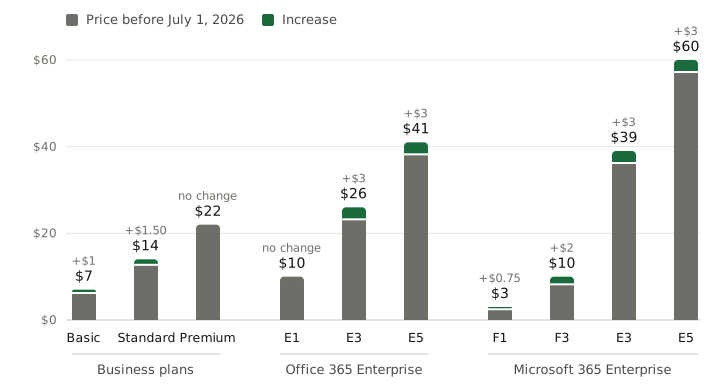
Several standalone products moved too: Microsoft 365 Apps for Business went from $8.25 to $10.00, and Entra ID Plan 1 from $6.00 to $7.00.
What Microsoft added to justify it
Microsoft paired the increase with new capabilities rolling out over summer 2026. Your tenant gets at least 30 days notice in the Message Center before they appear. What lands depends on the plan:
- Business Basic, Standard, and Premium gain 50GB of additional email storage per mailbox and an upgraded Copilot Chat that can see your inbox and calendar, plus Copilot Chat Analytics for tracking usage. Basic and Standard also get URL time-of-click protection, which re-checks every emailed link at the moment it is clicked rather than only on arrival.
- Office 365 E3 and Microsoft 365 E3 gain Microsoft Defender for Office 365 Plan 1, the email and Teams threat-protection product many businesses currently buy separately or replace with a third-party filter.
- Microsoft 365 E3 also picks up Intune Remote Help, Intune Advanced Analytics, and Intune Plan 2 for device management.
- Microsoft 365 E5 gets everything E3 gets, plus Microsoft Security Copilot and several advanced Intune components.
The pattern is clear: the price went up partly because the security and management stack inside each plan got deeper. That is a fair trade only if the features get turned on. In the small-business tenants we review, capability that is paid for but never configured is the rule, not the exception; it is the same story the Secure Score number tells inside most tenants that have never been worked on.
The self-audit: are you using what you pay for
Before your renewal locks in a year at the new rate, spend an hour on four questions.
1. How many licenses are assigned to nobody? In the admin center, Billing, then Licenses, compare purchased against assigned. Unassigned seats are pure waste, and they persist surprisingly well: someone bought five extra seats for a hiring push two years ago and nobody circled back.
2. How many are assigned to the wrong thing? Departed employees whose accounts were never cleaned up. Shared mailboxes holding a paid license they do not need, since shared mailboxes under 50GB are free. Service and scanner accounts sitting on a full Business Premium seat. Each one is the new per-user price, every month, for nothing.
3. What are you paying for twice? This is where the new inclusions matter. If you are on an E3 suite, Defender for Office 365 Plan 1 is now part of the plan, so a separate subscription to it, or to an overlapping third-party mail filter, deserves a hard look at its own renewal. The same goes for a standalone remote-support tool if Intune Remote Help now comes with your plan. None of this replaces the basics that live outside licensing entirely, like having SPF, DKIM, and DMARC actually configured on your domain; no plan upgrade does that for you.
4. What is switched off? The features you already had before this change are the bigger prize. A Business Premium tenant includes Intune, Conditional Access, and Defender for Business, and in most tenants we take over, some or all of that is sitting idle. While you are in the admin center, check how your users are doing multi-factor authentication too, because Microsoft is retiring SMS and voice MFA and accounts still using phone-based codes need to move regardless of what plan you are on.
What to do before your renewal
Find your renewal date. Admin center, Billing, Your products. That date is when the new pricing starts for you, and it is your deadline for the rest of this list.
Right-size before you renew, not after. Annual commitments lock the seat count for the term. Reclaim unassigned and misassigned licenses first, then renew the number you actually use.
Turn on what you now own. Watch the Message Center for the rollout notices, then configure the additions instead of letting them join the pile of idle capability. For Basic and Standard tenants, URL time-of-click protection is a genuine security upgrade that costs nothing beyond the price you are already paying.
Then judge the plan. Once the license count is honest and the included tooling is actually running, the question of whether the plan still fits answers itself. For some businesses the honest answer after this exercise is a smaller bill than before the increase.
If nobody in your business owns this exercise, that is normal and fixable. License reviews like this are part of how we run Microsoft 365 tenants, and switching on the security tooling you already pay for is usually the first project inside a broader security program. Get in touch before your renewal date and we will tell you what your tenant is leaving on the table.