At 8:52 on a Monday, someone on your team opens a company laptop. The camera glances at them, the desktop appears, and Outlook is already loading. They did not type anything. Twenty minutes later they approve a purchase order from their phone, with a thumb. Still no password.
That is passwordless sign-in, and most of your staff already use it at home without knowing the word. The business versions get sold as one thing. They are five, and the differences decide who gets locked out and who gets phished. The case for moving now and a rollout order are in our guide on passkeys for a small business. This one explains the machinery.
Three words that get mixed up
Multifactor authentication means a password plus a second step: a text code or an app prompt. The password is still there, and most second steps can be relayed by a convincing fake sign-in page. Our guide on Microsoft retiring SMS and voice codes covers which of those are going away.
Passwordless means the password is gone. The proof is a laptop, a phone, or a key, unlocked by a PIN, face, or fingerprint. Not every passwordless method resists phishing. Microsoft Authenticator’s tap-to-approve phone sign-in removes the password and is still not on Microsoft’s phishing-resistant list.
A passkey is the passwordless method that does. The key is tied to the exact website address it was made for, so a lookalike page cannot ask for it. Microsoft’s authentication overview, updated in September 2026, lists six phishing-resistant methods, all built the same way: a key pair, not a shared secret.
How a passkey works, in plain English
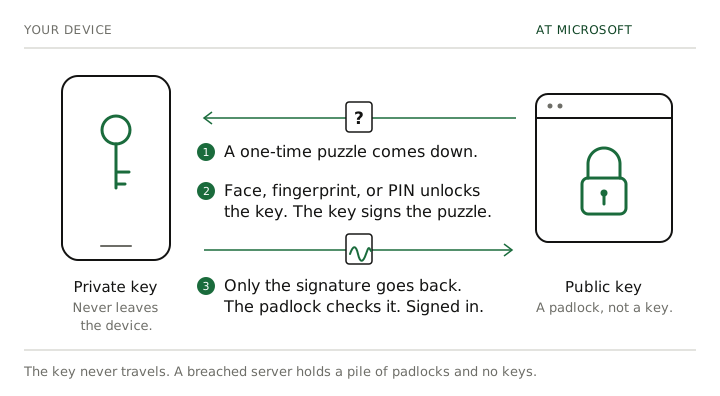
Think of a padlock and its key. When a person sets up a passkey, their device makes a matching pair: a private key that stays on the device, and a public key, the padlock, that it hands to Microsoft. At sign-in, Microsoft sends a one-time puzzle, the person unlocks the key with a face, fingerprint, or PIN, and the device sends back a signature. The gesture never leaves the device, the signature works once, and a breached server yields a pile of padlocks and no keys. Microsoft’s own 2026 figures put a passkey sign-in at about 3 seconds against 69 for a password plus traditional MFA: a vendor’s numbers, but the argument to give staff.
The five flavors
Where the private key lives is what separates them.
Windows Hello for Business. The company laptop is the key. Windows makes the key pair inside the laptop’s security chip, and the person unlocks it with the camera, a fingerprint, or a short PIN. Microsoft’s documentation, updated in March 2026, says the PIN never leaves the device and the chip has brute-force protection built in. It needs Windows Pro and a laptop the company manages, covers only that laptop, and costs nothing extra. It is the first step in any rollout; staff notice only that signing in got faster.
Microsoft Authenticator. Three things in one app, and the difference matters: the push prompt, which is MFA and can be relayed; phone sign-in, which is passwordless but not phishing resistant; and a passkey stored in the app, which stays on that phone and is on Microsoft’s phishing-resistant list. On a laptop it means scanning a QR code with the phone, which needs Bluetooth on both and the phone in the room. It is free. Authenticator stopped storing passwords in mid-2025, so it is not a password manager.
Hardware security keys. A key the size of a house key with the private key sealed inside. Plug in or tap, type the key’s PIN, touch the contact, on any computer, with no phone and no app. Microsoft can verify the exact make when the key is registered and refuse anything weaker, so its 2026 guidance names security keys for regulated industries and administrators. On Yubico’s US store in October 2026 the Security Key NFC is $29 and the YubiKey 5 NFC $58. Buy two per person, because keys get lost.
Built-in passkeys on Apple and Google devices. The passkey an iPhone makes with Face ID lives in iCloud Keychain and follows the person to their other Apple devices; Android does the same through Google Password Manager. These are synced passkeys: losing one phone is not a lockout, but the passkey is only as protected as a personal Apple or Google account, and Microsoft cannot verify its make. Microsoft’s 2026 guidance calls them fine for most users and device-bound ones right for administrators; your IT provider decides which kinds the company accepts. Company-managed Macs also get the Mac version of Hello: a key in the Mac’s security chip, unlocked with Touch ID.
Password managers. Bitwarden or 1Password generate a unique password for every site that still demands one, fill it only on the genuine address, and now store passkeys too. They are the bridge for the bank portal and the industry software that will take a password and nothing else for years. The vault’s own login should sit behind a passkey or a hardware key. Bitwarden lists Teams at $4 and Enterprise at $6 per user per month, billed annually, as of October 2026.
What to ask your IT provider for, desk by desk
- Everyday staff with a company Windows PC: Hello, plus a passkey in Authenticator as the second method.
- Staff with a phone and no company computer: a passkey in Authenticator, or a synced passkey if your policy allows it.
- Owners, finance, and anyone who approves a payment: two hardware keys plus Hello, with text and voice removed from the account.
- Administrators: two hardware keys, only verified makes accepted, nothing weaker registered.
- Mac users: the Mac version of Hello, with an Authenticator passkey as the second method.
- Shared machines and people without a smartphone: a hardware key per person, never per machine.
- Everyone: a business password manager for whatever still asks for a password, and two methods registered before anything is switched off.
Requiring the phishing-resistant method for the finance and administrator groups is a sign-in rule your IT provider sets. It needs a licensing tier that Microsoft 365 Business Premium includes and Business Basic and Standard do not.
Where this leaves you
Two questions for whoever runs your technology. “Of the five flavors, which two does each person on our team have today?” and “Which kinds of passkey does our company accept, and who decided that?” If the first comes back as “everyone has Authenticator,” you now know the follow-up: which of the three things in Authenticator.
Everything above except the hardware keys is configuration of what a Microsoft 365 Business Premium subscription already includes. When a company wants the inventory run, the policy written, and the enrollment staged so nobody is locked out, that is what our Microsoft 365 management and cybersecurity services do. Get in touch and we will tell you where you stand.