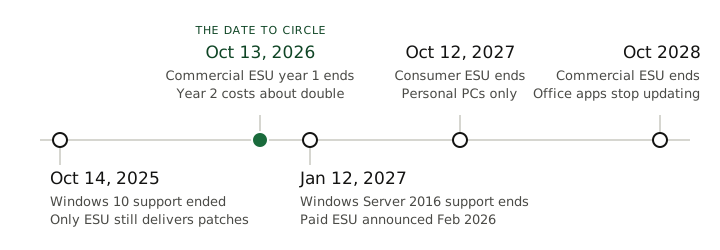
Windows 10 stopped receiving security updates on October 14, 2025, and Windows Server 2016 loses all support on January 12, 2027. In between sits the date that matters for a business: October 13, 2026, when the first paid year of Windows 10 security updates ends and the second year costs about double.
You may have read that Microsoft gave Windows 10 another year, to October 2027. It did, but for personal devices only. Microsoft’s own enrollment page says the consumer program cannot be used in commercial scenarios. If the machines in your office are still on Windows 10, the free extension is not yours, and the question to ask this week is simple: which of our computers are still on Windows 10, and are they enrolled in anything at all?
This guide covers what actually changes, which dates apply to a business rather than a home PC, and how to sequence the transition so it is a planned project rather than an emergency.
What “end of support” actually means
Nothing dramatic happens on the deadline. The machines boot, the software runs, the files open. That is the problem: end of support is invisible.
What ends is maintenance. Microsoft stops shipping:
- Security updates: fixes for newly discovered vulnerabilities
- Quality updates: bug and reliability fixes
- Technical support: no help from Microsoft when something breaks
The security piece is the one that matters. Attackers reverse-engineer every patch Microsoft ships for supported systems and check whether the same flaw exists in the unsupported versions, where it will now never be fixed. An unpatched, internet-connected machine does not get slightly riskier over time; it accumulates known, published, permanently open holes.
There is a paper cost too. Compliance frameworks and cyber-insurance questionnaires ask directly whether you run unsupported operating systems. “Yes” can mean a denied claim or a failed audit, independent of whether anything has actually gone wrong yet.
Windows 10: the deadline has already passed
Support ended in October 2025. As of now, an ordinary Windows 10 machine only receives security updates if it is enrolled in Microsoft’s Extended Security Updates (ESU) program. There are two versions of that program, and the difference is the part most business owners have not heard:
- Consumer ESU is free and, since Microsoft extended it in June 2026, covers enrolled PCs through October 12, 2027. It is for personal devices. Microsoft’s enrollment page states it cannot be used in commercial scenarios. A staff member’s home laptop can use it. The machines your company owns cannot.
- Commercial ESU is what a business buys. It is an annual subscription for up to three years, ending October 2028, and the price roughly doubles each year to push migration. Year one ran from October 14, 2025 and costs about $61 per machine. Year two starts October 14, 2026 at about $122. Year three doubles again. It is also cumulative: a machine that skipped year one pays for year one and year two to join in year two.
- Either way, ESU requires Windows 10 version 22H2 and delivers security fixes only. No feature updates, no support.
So the date to circle for a business is October 13, 2026, when year one ends. Every Windows 10 machine you still own on that date is either paying double, or unpatched.
One footnote: Microsoft 365 Apps (Word, Excel, Outlook) will keep receiving security updates on Windows 10 through October 2028. That keeps Office itself patched. It does not make the operating system underneath it any less exposed.
The decision for each machine is binary. If the hardware meets Windows 11’s requirements (TPM 2.0 and a supported CPU, which broadly means machines from about 2019 onward), the upgrade is free and mostly uneventful. If it does not, the machine needs replacing, and ESU is the mechanism that buys you an orderly schedule instead of a scramble. Does ESU actually matter? Microsoft’s September 2026 security update, the largest it has ever shipped, included a fix for a Windows flaw attackers were already using. Enrolled Windows 10 machines got it. Unenrolled ones did not.
Windows Server 2016: January 12, 2027
Server 2016 has been out of mainstream support since January 2022 and has received only security fixes for years. On January 12, 2027, those stop too.
In February 2026, Microsoft announced a paid ESU program for Server 2016, covering up to three years after that date and sold through volume licensing and cloud solution providers. That is a change from earlier guidance, and it is worth understanding what it is not. Server ESU is priced against the server’s own Windows Server license, not as a flat fee per machine, so for a typical small-business server it costs far more than the desktop program. It is a bridge for a server you genuinely cannot move in time. It is not a reason to stop planning. January 12, 2027 is still the date the work has to be done by, or paid for.
Servers are also a different kind of project than desktops. A Server 2016 box is rarely just an operating system; it is the file server, the domain controller, the host for the line-of-business app that the whole company runs on. The migration paths, roughly in order of how often they make sense:
- Move the workload to a service, not a newer server. File shares to SharePoint or Azure Files, the aging on-prem app to its vendor’s hosted version. Many businesses discover the 2016 box is the last server they need to own.
- Upgrade to a current Windows Server (2022 or 2025), on new hardware or virtualized. This is the right answer when the workload genuinely must stay on-prem.
- Migrate the server to Azure. Historically Microsoft has included extended updates at no extra charge for servers moved into Azure. Confirm that arrangement applies to 2016 before building a plan on it.
Whichever path fits, plan for months of runway rather than weeks, and make sure a tested backup and recovery setup is in place before anyone touches anything. Migration day is exactly when restore capability matters most.
A realistic timeline from here
Working backward from the deadlines, a sane sequence looks like this:
- Now: inventory. Every Windows 10 machine (and whether its hardware qualifies for Windows 11), every Server 2016 instance and what actually runs on it. With the right tooling this is an afternoon of work, and it turns a vague worry into a concrete list.
- Before October 13, 2026: resolve every Windows 10 machine. Upgrade the eligible ones, schedule replacement for the rest, and put commercial ESU year two only on the machines that genuinely cannot move yet. At $122 a machine, a second year of ESU on a five-year-old PC is often most of the way to a replacement.
- Q4 2026: server decisions made, migration path chosen, budget approved. Hardware lead times and vendor scheduling both get worse as a deadline approaches, because everyone else is running at the same date.
- Well before January 2027: Server 2016 workloads migrated and verified, old systems retired. Server ESU is the fallback for the one workload that slips, not the plan.
The pattern we see repeatedly: businesses that start a year out do this as routine maintenance; businesses that start three months out pay rush pricing for the same outcome.
Where to start
Three questions to ask this week, whoever handles your IT:
- How many of our computers are still on Windows 10, and which of those can take Windows 11?
- Are the ones that cannot enrolled in commercial ESU, and what happens to them on October 13?
- What runs on the Server 2016 box, and where is it going?
If you have an IT partner, ask them for the inventory: the list of what is unsupported, what qualifies for upgrade, and what the migration plan is. If the answer is vague, that is information too.
If you do not have one, this is exactly the category of problem managed IT exists for: lifecycle tracking, patching, and migrations handled as ongoing maintenance instead of periodic emergencies. Get in touch and we will start with the inventory. It is the fastest way to find out whether you have a small problem or a large one.