The password rules most businesses still enforce are the ones NIST now says to stop using. In July 2025, NIST finalized the latest revision of SP 800-63B, the federal standard that most security frameworks and auditors eventually follow. The short version: mandatory symbols and numbers are out, forced 90-day resets are out, and length is in. If your policy was written more than a few years ago, it is probably making your team less secure while annoying them daily.
This guide covers what changed, why the old rules backfired, and what a current password policy looks like for a small or midsize business.
What NIST actually changed
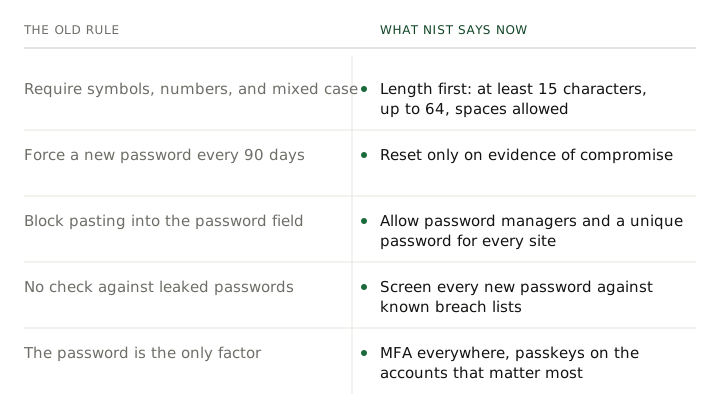
The updated guidance makes five moves that matter to a business:
- Length over complexity. The floor is 8 characters, and NIST recommends 15 or more when a password is the only factor protecting the account. Systems should accept passwords up to at least 64 characters, including spaces.
- No more composition rules. Requiring an uppercase letter, a number, and a symbol is now explicitly off the table. NIST’s language is “shall not,” which is as firm as the standard gets.
- No more scheduled resets. Forcing a password change every 60 or 90 days is out. Passwords change when there is evidence of compromise, not on a calendar.
- Screen against known breaches. New and changed passwords must be checked against lists of passwords already exposed in breaches, plus obvious junk like dictionary words and your own company name.
- Let people use password managers. Sites should allow pasting into the password field, because the guidance assumes people are storing long random passwords in a manager rather than memorizing them.
Why longer beats complex
Password-cracking software does not think in terms of “strong-looking.” It thinks in guesses per second, and the only thing that reliably drives the guess count up is length. Each additional character multiplies the search space; a required symbol adds almost nothing, because humans put it in the same place every time. Attackers know the exclamation point goes at the end and the capital letter goes at the front, and their tools try those patterns first.
That is why correct horse battery staple style passphrases beat Tr0ub4dor!. Four random common words are easy to type, easy to remember, and take absurdly longer to crack than eight characters of forced complexity. The old rules produced passwords that were hard for humans and easy for computers. The new guidance flips that.
Forced resets made things worse
The 90-day reset felt responsible, but two decades of evidence showed what it actually produces: Falcons2024! becomes Falcons2025!. When people know a password is temporary, they invest less in it, choose weaker ones, and modify them predictably. Attackers who learn an old password can usually guess the current one in a handful of tries.
There is a real trigger for a reset, and it is compromise. If a password shows up in a breach dump or an account shows sign-in attempts from somewhere it should not, change it immediately. Otherwise, a long, unique, never-breached password is safer left alone.
One honest caveat: some compliance frameworks and cyber-insurance questionnaires still have rotation language baked in. If a contract or regulation binds you to it, follow it and note that the standard it was based on has moved. Do not volunteer for it anywhere you are not bound.
The check most businesses skip: breach screening
The most common way a business account gets taken over is not a brilliant hack. It is a password reused from some other site that got breached years ago, tried against your Microsoft 365 tenant by a bot. No complexity rule catches that, because the password already met the rules when it leaked.
Breach screening does catch it. Microsoft Entra can enforce a banned-password list and flag leaked credentials, and standalone tools do the same for other systems. If you change one technical control after reading this, make it this one.
A strong password is still only one factor
Everything above raises the cost of guessing. It does nothing against phishing, because a user who types a perfect 20-character passphrase into a fake login page has donated it. That is why MFA is not optional in the updated guidance or in real life: the stolen password alone stops being enough.
Which MFA method you use matters more than it used to. Text-message codes are the weakest form still in wide use, and Microsoft is retiring them outright. We covered the timeline and what to do about it in our guide on Microsoft retiring SMS and voice MFA. App-based prompts are good; phishing-resistant methods are better.
Passkeys are where this ends up
The logical endpoint of “longer, unique, never phished” is a credential that is not a password at all. A passkey is a cryptographic key stored on the user’s phone, PC, or a hardware key, unlocked with a fingerprint, face, or PIN. There is nothing to remember, nothing to reuse, and nothing to type into a fake page, which is why NIST classes this approach as phishing resistant and why Microsoft is making passkeys the default sign-in for Microsoft 365 in September 2026.
You do not need to convert everything overnight. Turn passkeys on for the accounts that matter most, let people enroll the way they already unlock their phones, and keep strong passwords plus MFA everywhere else in the meantime. Our passkeys guide for a small business has the rollout order.
What your policy should say now
If you want the one-paragraph version to hand to whoever manages your systems:
- Minimum 14 to 16 characters, maximum of at least 64, spaces allowed. Encourage passphrases.
- Remove every composition rule. No required symbols, numbers, or case mixing.
- Kill the scheduled reset. Reset on evidence of compromise only, unless a regulation you are bound to says otherwise.
- Turn on breach screening in Microsoft Entra or the equivalent for your identity system.
- Provide a password manager to the whole team and expect unique passwords per site.
- Require MFA everywhere, prefer app-based or phishing-resistant methods, and start enrolling passkeys on your most important accounts.
If you have an IT partner, ask them which of the six are actually enforced in your tenant today. If you do not have one, this is squarely what our cybersecurity and Microsoft 365 management services cover: we audit the current policy, flip the right switches in Entra, roll out the password manager, and stage the passkey enrollment. Get in touch and we will start with what your policy says now versus what it should.